 Coffee
Everything in Coffee
Every tool in the app, in one place. Most of these are working demos: click, type and drag. Your notes stay plain Markdown files in a folder you own, whatever you use.
WritingOrganisingMaths and diagramsFiles and syncAI and automationLook and sound
The bigger ones have their own pages: sums in your notes, meeting notes and reviewing AI edits.
Writing
Comments stay out of the file. Your Markdown stays clean.
Comments
Select any words and comment. Click the mark to open it.
The first draft is for you.
Everything but this sentence steps back.
So you keep going.
Press ⌘⇧T and your line stays in the middle.
Focus and typewriter
For long stretches, and for long documents.
A quiet outline
Headings become small marks in the margin. Click one to jump.
Version history
Drag it. Each version says what changed, the ones you name are kept, and restoring can be undone.
Templates
A template is just a .md file in a folder, with the date filled in. ⌘T opens today's note.
Quick capture
A thought, Return, and you're back. It lands in Inbox.md with the time.
Plan	Price
Monthly	€3
Yearly	€29
Paste anything
Spreadsheet cells become a table. A web page keeps its headings, lists and links.
Move whole sections
Drag a heading in the outline and everything under it comes too. ⌘⇧O
Check document
Broken links, missing images and skipped headings. Press Fix.
| Day | Cups | Beans |
|---|---|---|
| Monday | 2 | Kenya |
| Tuesday | 3 | Brazil |
| Wednesday | 1 | Kenya |
| Thursday | 2 | Colombia |
Tables, and lists, reshaped
Make a table of any size, then move, insert and delete columns. Turn a list into bullets, numbers or tasks with ⌥⌘8, ⌥⌘7 or ⌥⌘9.
```python
1# Cups for the week
2def cups(days, per_day=2):
3    return days * per_day
4print("Monday", cups(7))
```
Code, coloured
Code blocks are coloured by their language, about 30 of them, from Swift and Python to SQL and YAML. Line numbers are a setting away, and never go into the file.
1 Tram 28 starts at Martim Moniz.
Callouts and footnotes
GitHub's > [!TIP] boxes and [^1] notes, drawn as you write and carried into PDF and Word.
Emoji by name
Type a colon and a few letters for a list, or a whole :tada: and a space. The file keeps the emoji itself.
The hotel is really close to the river, and in order to see the sunset we walked up to the the castle.
Style Check
Small dots under filler words, stock phrases and words typed twice, plus your own list. Nothing goes into the file, and no AI is involved.
|Plan|Price|
|-|-|
|Monthly|€3|
|Yearly|€29|
| Plan    | Price |
| ------- | ----- |
| Monthly | €3    |
| Yearly  | €29   |
Tidy Note
Lines up table columns, spaces out headings and renumbers lists, in one step you can undo. Only when you ask.
Recording, 16 Nov 2026 at 09:30 (2:14)
So the launch moves to Thursday, and Ana sends the press list by Tuesday.
Voice notes
Note › Record Audio puts a recording in the note, and what was said is written under it, read on your Mac or iPhone, never sent anywhere.
YouTube in a note
A video's link alone on a line shows its picture, and a click plays it right there. The note keeps the plain link.
Organising
Folders, pins and order
Your folders, as they are on disk. Pin the notes you live in, sort each folder by date or title, and fold away any section of the sidebar.
Folders from anywhere
Add a folder from your Mac or an external drive. Its notes join search, links and tags, and stay where they are.
Call about the #work/acme renewal.
Tags, nested
Write #tags in the text or in front matter. A slash nests them, and choosing work shows all of work.
Book the hotel from [[Lisbon budget]].
Linked from Packing list, Weekly plan
Links between notes
Type [[ to link a note. Rest the pointer on a link to read its start, and rename a note without breaking a link to it.
[TOC]
- Before we go
- Packing
- Alfama
- The way home
See [[Lisbon budget#Hotels]]
Contents, and links to a heading
A line with [TOC] lists the note's headings and keeps up as you write. [[Note#Heading]] and [text](#heading) open right at that heading.
A graph of your notes
See how your notes link, around the one you're in or across the library. Hover to light a note's links, click to open it. ⌥⌘G
Replace in all notes
See every match first, leave any out, and undo the whole replace later. Each note keeps its old version in history.
Command palette
Every command in the menus, a few letters away.
Search inside pictures
Photos of whiteboards and scanned receipts are read on your Mac, so search finds their words too.
Spotlight and Quick Look
Notes turn up in Spotlight, and the space bar previews them in Finder. Private notes never show their text.
```query
from: #project
where: status != done
show: status, due
| Title | Status | Due |
|---|---|---|
| Website redesign | doing | 2026-11-20 |
| Hiring plan | draft | 2026-11-28 |
| Office move | waiting | 2026-12-04 |
Notes as a table or a board
A query block lists notes by tag, folder and front matter, and a click opens one. The file keeps only the query.
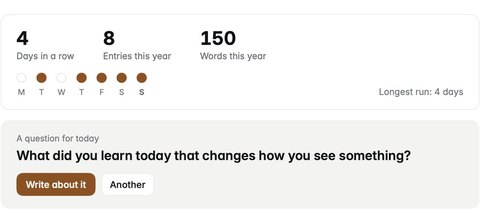
Journal
Your daily notes as a journal: days in a row, a question for today, what you wrote on this day before, and every entry by month with search and tags. The entries stay ordinary notes.
Agenda
- All day: Mum's birthday
- 09:00–09:30 Standup
- 14:00–15:00 Design review
Today
- Renew passport (overdue)
- Send the invoice
Calendar and Reminders
Today's note starts with the day's events and the reminders due. A task goes to Reminders with ⌃⌘R.
Maths and diagrams
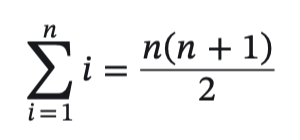
Math, drawn natively
Write TeX between $$ lines, or $…$ inside a sentence, with chemistry in \ce{} and equation numbers from \tag{}. Formulas are drawn as you write, and in your PDFs, Word files and books.
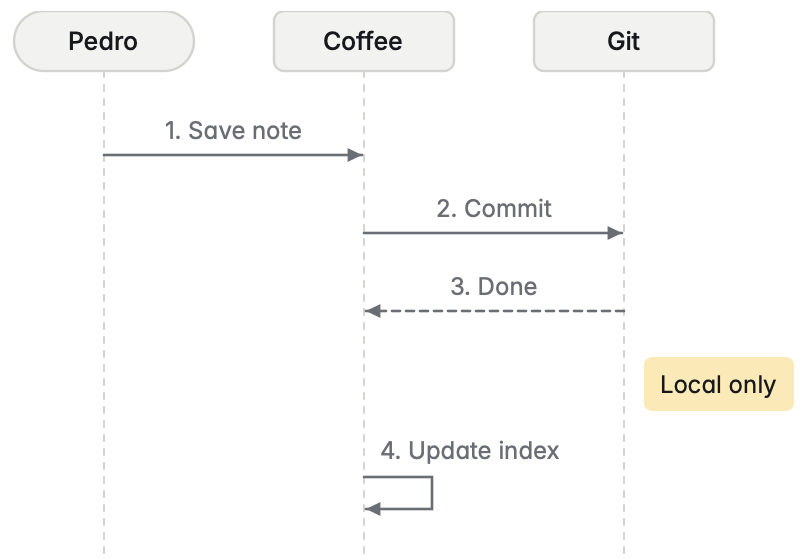
Diagrams from text
Mermaid flowcharts, pie charts, sequence, gantt, class, state and ER diagrams and mind maps, drawn as you type in your theme's colours, or in black and white. No web view, nothing fetched. One that can't be drawn says which line is wrong.
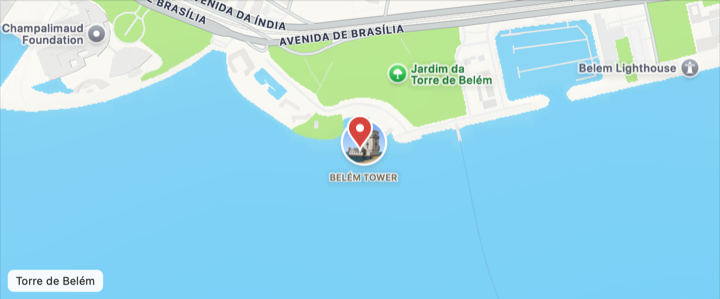
Maps from a link
Paste a Google Maps or Apple Maps link, coordinates or just an address in a map block, and the place is drawn with Apple Maps, with nothing to sign up for. Click the map to drag and zoom it, or tap it on iPad. The note keeps the link.
Canvas
Cards, notes, links and groups on a board, with arrows between them. Saved as a .canvas file that Obsidian opens too.
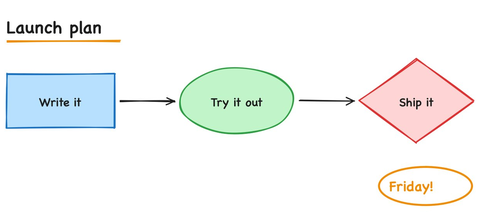
Whiteboard
Sketch boxes, arrows and words on a board, and it shows inside your note. Saved as an .excalidraw file that Excalidraw and Obsidian open too.
Files and sync
Private notes
Touch ID, encrypted on disk, hidden from search and AI.
Clipboard history
What you copy, searchable and encrypted on this Mac. Password managers' items are never kept.
Google Drive can keep notes online until they're opened. Mark the Coffee folder Available offline so search finds every note.
Notes in your cloud drive
iCloud Drive, Google Drive, Dropbox, OneDrive and more, through their own Mac apps. History and comments move too.
A window for each file
Moving around stays in one window. Open a file from Finder, and it gets its own.
Your files stay plain text, and they open anywhere else too.
Your default for .md files
One button in Settings. Double-click any Markdown or text file and it opens here.
Share > Coffee
Save a page or some text from Safari, Mail, Notes and other apps, as a new note or a line in your inbox.
- 01 Before we go
- 02 Alfama
- 03 Belém
- 04 The way home
A book from your notes
A folder or a tag becomes one EPUB, a chapter per note, ready for Apple Books.
AI and automation
Connect AI apps
Let Claude and others read and write your notes over MCP. Off until you turn it on.
Propose a change, without learning Git
Write it, describe it, press Propose. Coffee sends only that note to a new branch and opens the pull request. Nothing else on your Mac changes.
Works on the note you have open. Anything more is asked for in plain words first.
Plugins
Sheet music, chess boards, molecules, citations, Wikipedia lookups, book cards and more, from a directory Coffee reviews. Each is free, and off until you turn it on.
Look and sound
coffee-theme:1:Paper:light:#FBF7EF,#FFFDF8,…Themes
Five to choose from, or your own with a colour for each part of the app, shared as one line of text. Coffee's own follows light, dark or your Mac.
Keyboard sounds
Dry recordings of Cherry MX Red, Brown and Blue. Press these keys. Off by default in the app.
Present as slides
Each --- line starts a new slide, shown full screen with its formulas and diagrams. ⌥⌘P
Try it on your own notes.
14 days free, with no card and no account. Then €3 a month, €29 a year, or €79 once with two years of updates. One purchase covers your Mac, iPhone and iPad. macOS 15 or later, iOS 18 or later. See pricing.