 Coffee
Query blocks
Mac
A code block named query lists notes under it as a table or a board of cards, picked by their tag, folder and front matter properties.
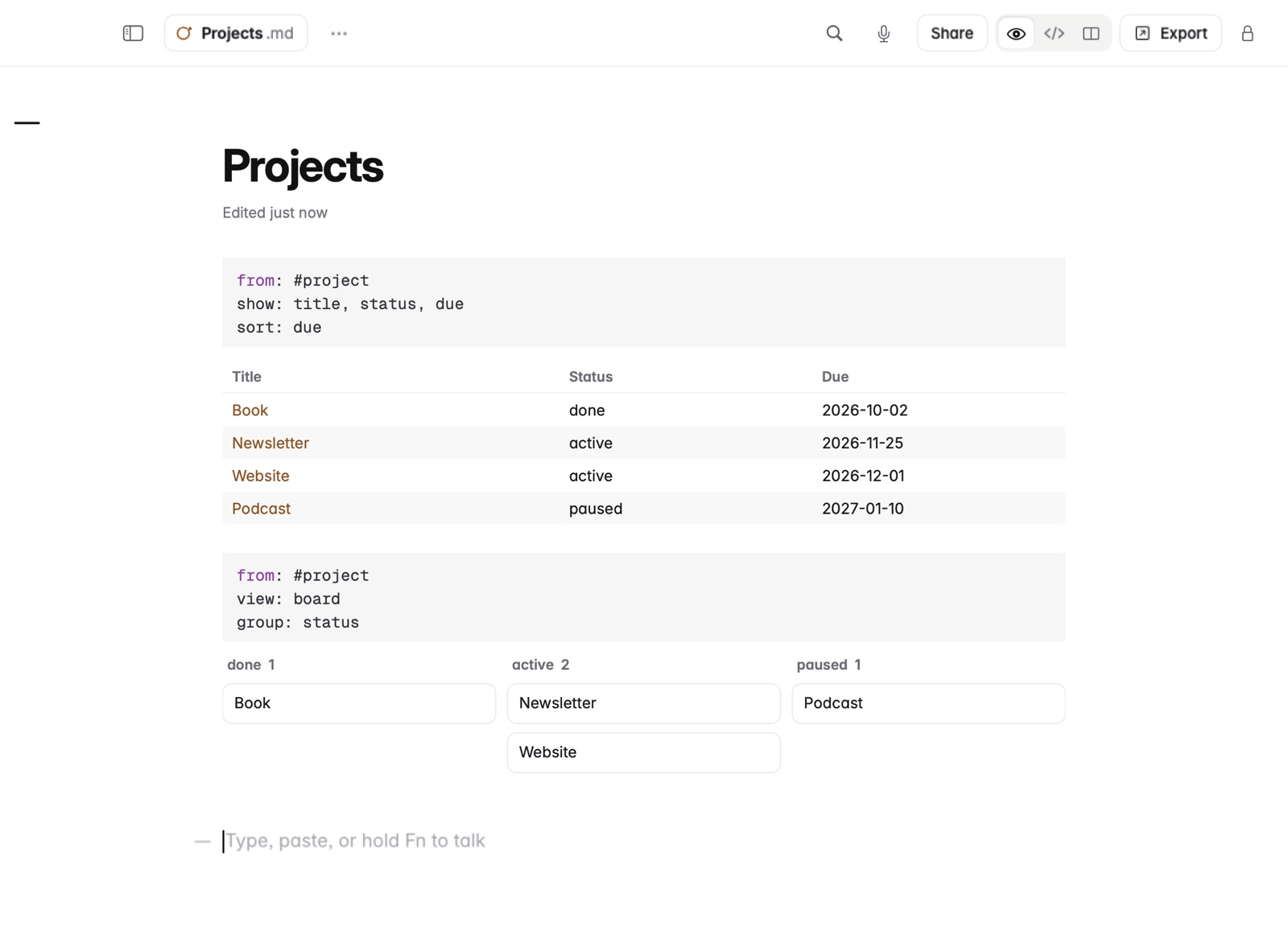
How to write a query
- Give your notes properties in their front matter, such as
status: activeanddue: 2026-12-01. - In any note, start a code block named
query. - Add the lines you need, one per line:
from:takes a#tag(its nested tags too), a folder, orall.where:compares with=,!=,<,>,<=,>=andcontains, joined withand.show:lists the fields to show, separated by commas.sort:names a field. Adddescto reverse it.limit:caps the list, 200 by default.view:istableorboard, andgroup:picks the field a board groups by.- Close the block. The list appears under it.
Example
In Markdown
```query
from: #project
where: status != done
show: title, status, due
sort: due
view: board
group: status
```
This shows every project note that isn't done as cards, in one column per status, soonest due first. With view: table you get a table with columns for title, status and due.
Good to know
- Fields are front matter properties plus
title,folder,tagsandmodified. - Numbers compare as numbers, and year-first dates like
2026-12-01in date order. - Clicking a row or card opens the note.
- Queries only read. You change a note's properties in the note itself.
- Private notes are left out.
- The file keeps only the query, so other editors and exports show a code block.